AI tools no longer just write emails or summarize documents. They want to act on your finance stack.
An AI agent that answers "what is my burn this week" or "draft the invoice for Zensus" has to reach into QuickBooks, the bank, and the CRM to do its job. There are two ways that reach happens. One is a command line interface (CLI). The other is the Model Context Protocol (MCP), an open standard introduced by Anthropic in late 2024 and now adopted across the industry.
For founders and finance teams, the difference between these two doors matters more than it sounds. It is partly a performance question, but it is mostly a compliance question. This guide explains both options in plain English, then makes the case for why MCP is the one that should be touching your books.
In this guide, we will cover:
- what MCP and CLI access actually are
- why the choice matters for finance and accounting workflows
- the compliance argument for MCP
- what is shipping right now in QuickBooks, Xero, and Plaid
- how Zensus thinks about agent access to finance data
Why AI Agents Suddenly Need a Way to Reach Your Finance Stack
Through 2024 and early 2025, most AI products were assistants. You typed, the model talked back. Useful, but bounded.
The shift in 2025 and 2026 has been toward agents. An agent is a model that can take actions on your behalf. Instead of summarizing a meeting, it can update the CRM. Instead of explaining a spreadsheet, it can pull the underlying numbers and rebuild the spreadsheet.
For a founder running finance, that shift translates into questions like:
- "show me my burn this week"
- "draft the invoice for Zensus"
- "what scenarios put us under six months of runway"
- "flag any vendor whose monthly spend jumped more than 30 percent"
Every one of those needs the agent to reach into a real system. QuickBooks, the bank, the CRM, the payroll provider. That reach happens through one of two doors. Understanding which door your tooling uses is now part of evaluating any AI product that touches your books.

What a CLI Agent Actually Does (in Plain English)
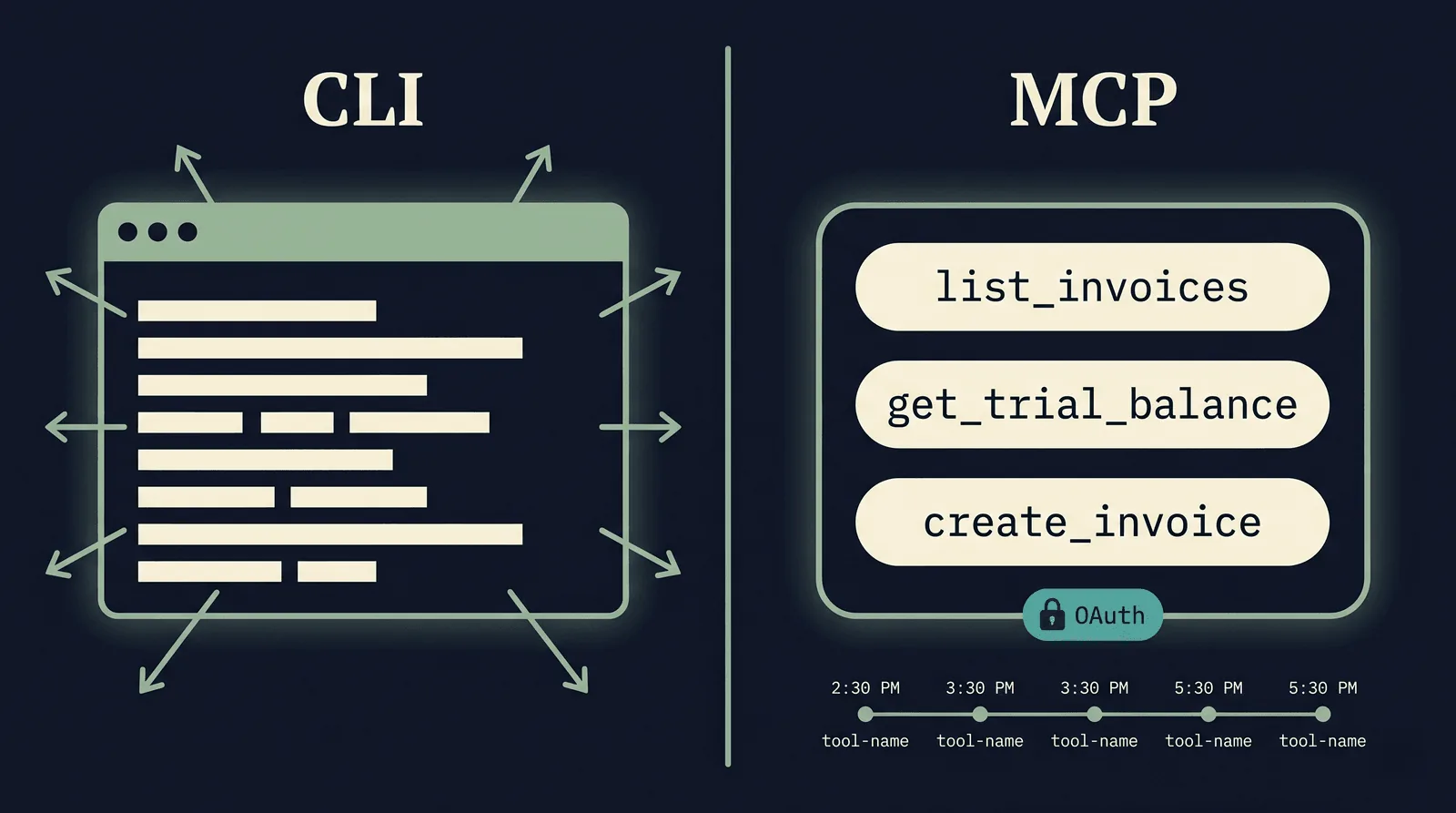
A CLI agent gets a shell. The agent runs commands the way a developer would type them into a terminal, reads the text output, and decides what to do next.
In practice, a CLI agent on a finance workstation might:
- open the QuickBooks export menu and run a CSV export
- read the CSV with a text command, parse what it sees
- run a script to filter, sum, or format the data
- paste the result back into a chat window
Developers like this approach because there is no schema overhead. The agent works the way humans work. It is fast, flexible, and adapts to whatever tools are already on the machine. In early-2026 benchmarks, CLI agents have outperformed MCP-based agents on raw task completion by a meaningful margin, partly because they do not pay the cost of loading tool definitions into the model's context window.
The flip side is what should give finance and security folks pause:
- the agent can read anything on the machine, including files you did not intend it to see
- what the agent did is reconstructed from terminal scrollback, not a structured audit log
- credentials sit in the same shell the agent uses, so a misstep can leak them
- there is no enforced boundary between "tools the agent should use" and "things on the machine"
For an engineer iterating locally, that tradeoff is fine. For an agent that is about to look at your books, it is a much harder thing to defend in front of an auditor.
What an MCP Server Actually Does (in Plain English)
The Model Context Protocol is an open standard introduced by Anthropic in late 2024. It is now backed by OpenAI, Google, Microsoft, and IBM, with a clear public explainer from IBM on what the protocol does.
An MCP server publishes a list of typed tools. Each tool has a name, a description, a strict input schema, and a strict output schema. The agent discovers the tools by asking the server, then calls them through the protocol.
In practice, a QuickBooks MCP server might expose tools like:
list_invoiceswith an optional date rangeget_trial_balanceas of a dateget_ar_agingby customercreate_invoicewith line items
The agent can only call those tools. It cannot read the rest of the machine, cannot run arbitrary scripts, and cannot invent fields the schema does not allow.
What that gives you, structurally:
- OAuth-based authentication, with tokens scoped to specific accounts and specific tools
- schema validation on every call, so the agent cannot invent or omit required fields
- a structured audit log of every tool call, with inputs and outputs, ready for an SOC 2 or audit-evidence review
- centralized permission control, so you can revoke a tool without redeploying the agent
The cost is real. Loading a long list of tool schemas into the model's context window takes space, slows down simple tasks, and can confuse the agent on small jobs. For finance work, that cost is the price you pay for being able to prove what happened.
Where Each One Fits, in Plain English
The honest answer is that neither approach wins everywhere. The question is which axis matters more for the workflow in front of you.
Pick CLI when:
- a developer is iterating locally on their own machine
- the agent is touching files and tools that already belong to that developer
- speed and flexibility matter more than auditability
- there is no regulated data, no customer data, and no finance data in scope
Pick MCP when:
- the agent will touch a system of record (QuickBooks, the bank, the CRM, the warehouse)
- there is customer or company financial data involved
- you need an audit log a third party can verify
- different users on the same product need different permission scopes
- you might one day get asked "what did the agent do, and on whose behalf"
If you are reading this and you run finance for a startup, almost every workflow you care about lands in the second list.
The Compliance Argument: AI as a Data Processor Under Your WISP
This is the part of the conversation that almost no one is having yet, and it is the most important one for finance teams.
If an AI agent is reading your QuickBooks, the AI is now a data processor under your Written Information Security Program (WISP). That is the framing covered well in Verito's 2026 piece on QuickBooks, AI, and compliance. Treating the agent like "just another tool" misses the actual category it falls into.
A CLI agent on a finance workstation creates several problems for that posture:
- there is no structured record of which records the agent read or wrote
- there is no scoped permission boundary, so the blast radius of a prompt injection is the whole machine
- there is no clean way to tell a customer or an auditor what the agent saw
- credentials and PII sit in the same context the model produces tokens from
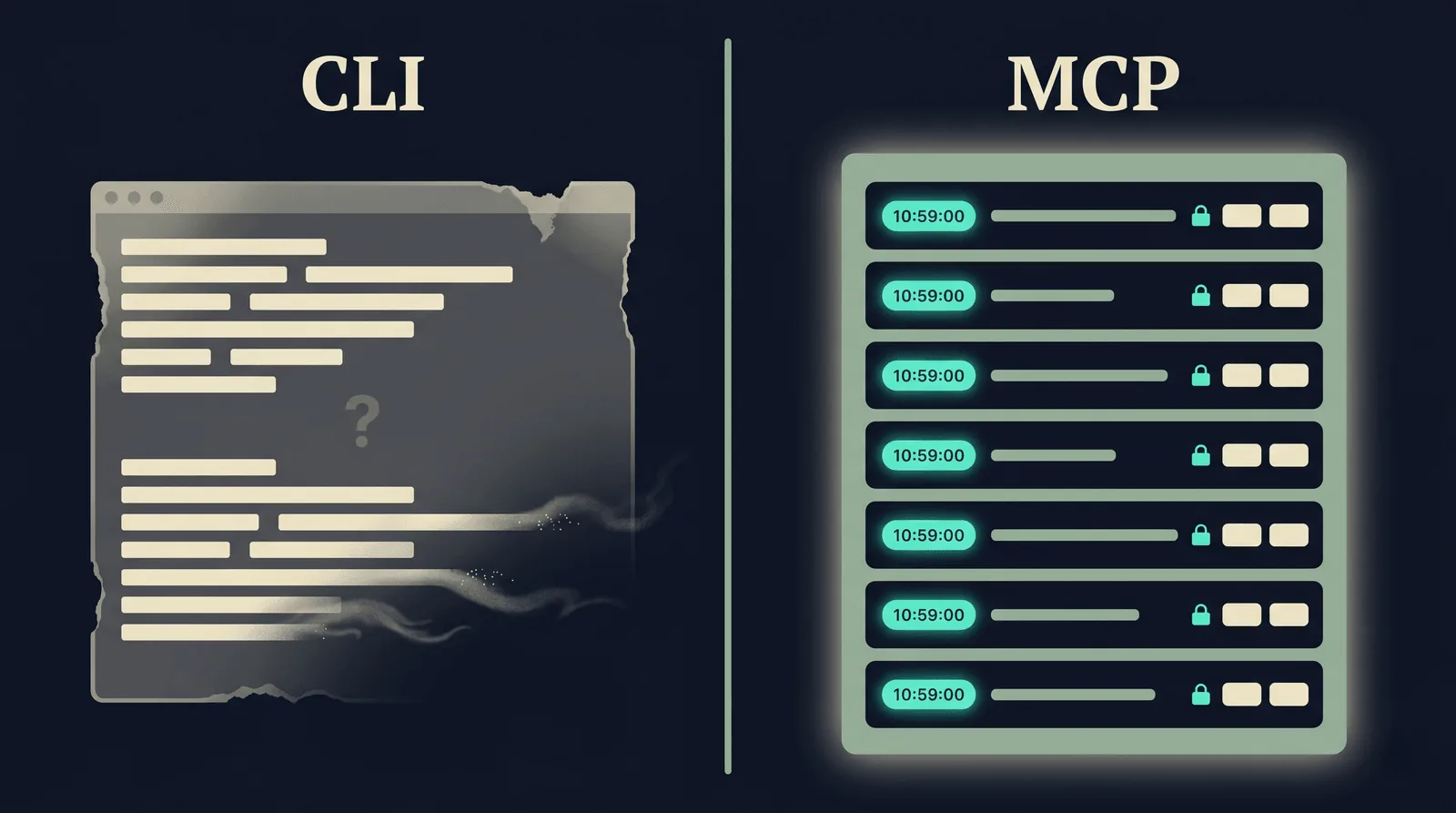
An MCP server gives you the artifacts an auditor expects:
- scoped OAuth tokens that can be revoked without code changes
- structured tool logs that map cleanly to a SOC 2 or ISO 27001 control narrative
- deterministic permission boundaries that the model cannot escape by saying clever things
- a clear answer to "what did the agent see, and what did it change"
You can read more about how Zensus thinks about the security posture for finance data on the security page, and the third parties that touch your data on the subprocessors page.
What Is Shipping Right Now: QuickBooks, Xero, and Plaid
The reason this debate is no longer abstract is that 2025 and 2026 brought a wave of real MCP servers for the systems finance teams actually use.
QuickBooks Online:
- Intuit shipped an official QuickBooks MCP server in late 2025
- community servers from Improvado and others give agents 30+ tools across invoicing, expenses, reporting, and cash position
- practical effect: an agent can answer "what is our cash on hand" against live QuickBooks data, without anyone exporting a CSV
Xero:
- same pattern, with community MCP servers letting agents query the chart of accounts, post journal entries, and pull aged receivables
Plaid, Salesforce, NetSuite:
- moving in the same direction in 2026, with MCP servers exposing the high-value read paths first (transactions, balances, customer records) before opening up write paths
Most of these are tools the agent uses, not tools you log in to. The reader still sees QuickBooks as QuickBooks. What changes is who else, behind the scenes, can read it on your behalf, and on what terms.
What This Changes for Cash Flow, A/R, A/P, and Month-End
The compliance and performance questions are upstream. The downstream question is what actually gets easier when MCP is wired up correctly.
Month-end close:
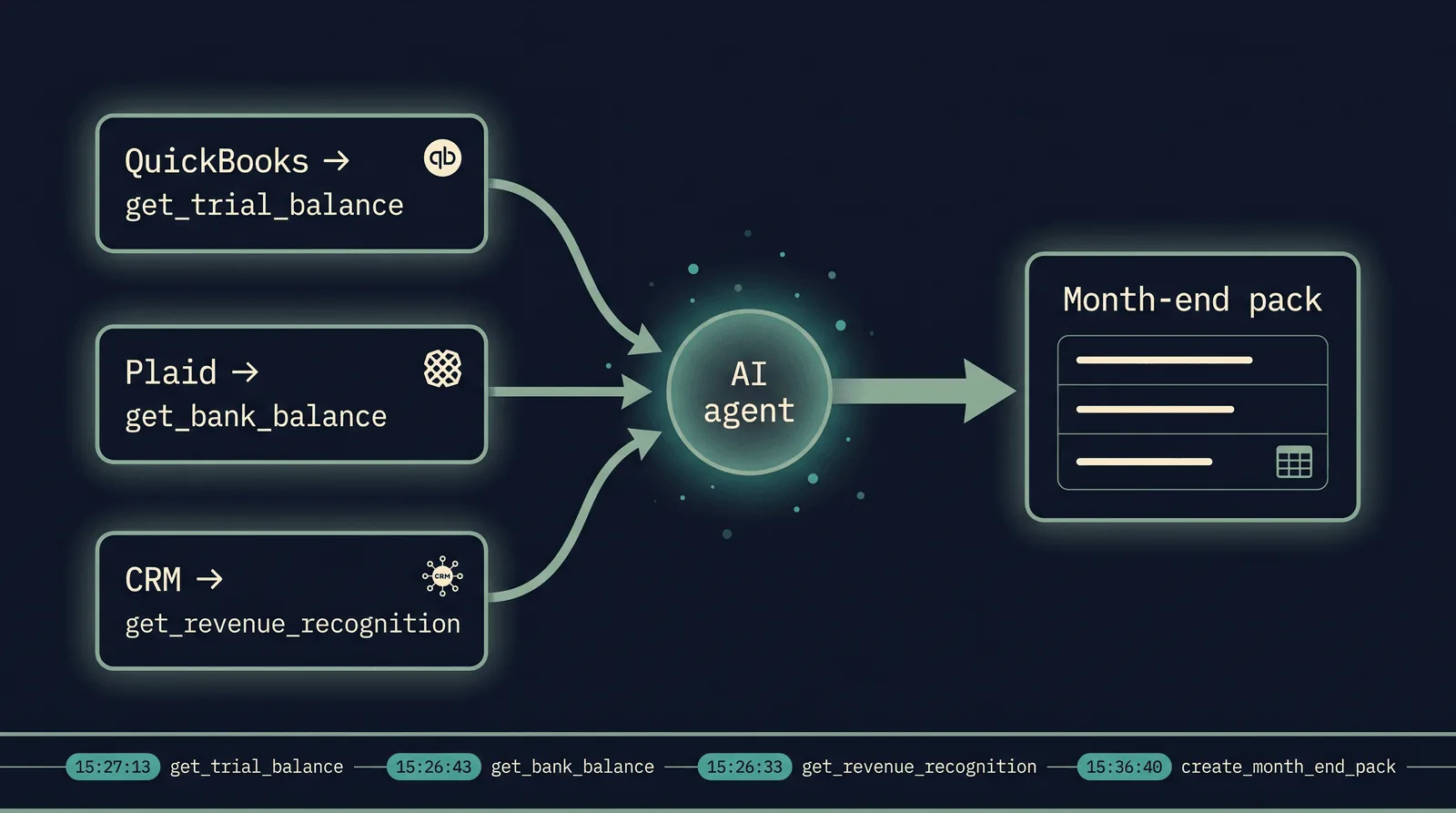
- an AI agent can pull the trial balance from QuickBooks, the bank balance from Plaid, and revenue recognition from the CRM in one orchestrated pass
- variance analysis can be drafted in the time it takes to make coffee, rather than over the course of a Friday afternoon
- the agent leaves a structured audit log of which queries it ran and against which accounts
Audit-evidence collection:
- traditional audit workflows consume 60 to 70 percent of auditor time on manual evidence collection, according to Arcade.dev's enterprise MCP guide for accounting firms
- MCP-driven agents that can pull general ledgers, scan invoices, and reconcile transactions against the bank reduce that share materially
- because every tool call is logged, the evidence is auditable in a way a screenshot from a chat session is not
Cash flow forecasting:
- scenario questions stop being a back-and-forth spreadsheet exercise and become live queries
- an agent can answer "if our largest customer pays 30 days late, when do we run out of cash" using current balances and current contracts
- the forecast you review on Monday morning is built from what cleared on Friday, not what was true the last time someone updated the model
If you want a deeper view of the forecasting workflow itself, the companion post on cash flow forecasting covers the methods, time horizons, and accuracy practices in detail.
Once agents are in the forecast, compute becomes a variable cost line. See forecasting AI compute costs for founders for how to model inference spend, the inference cost paradox, and 2026 unit economics benchmarks.
How Zensus Thinks About Agent Access to Finance Data
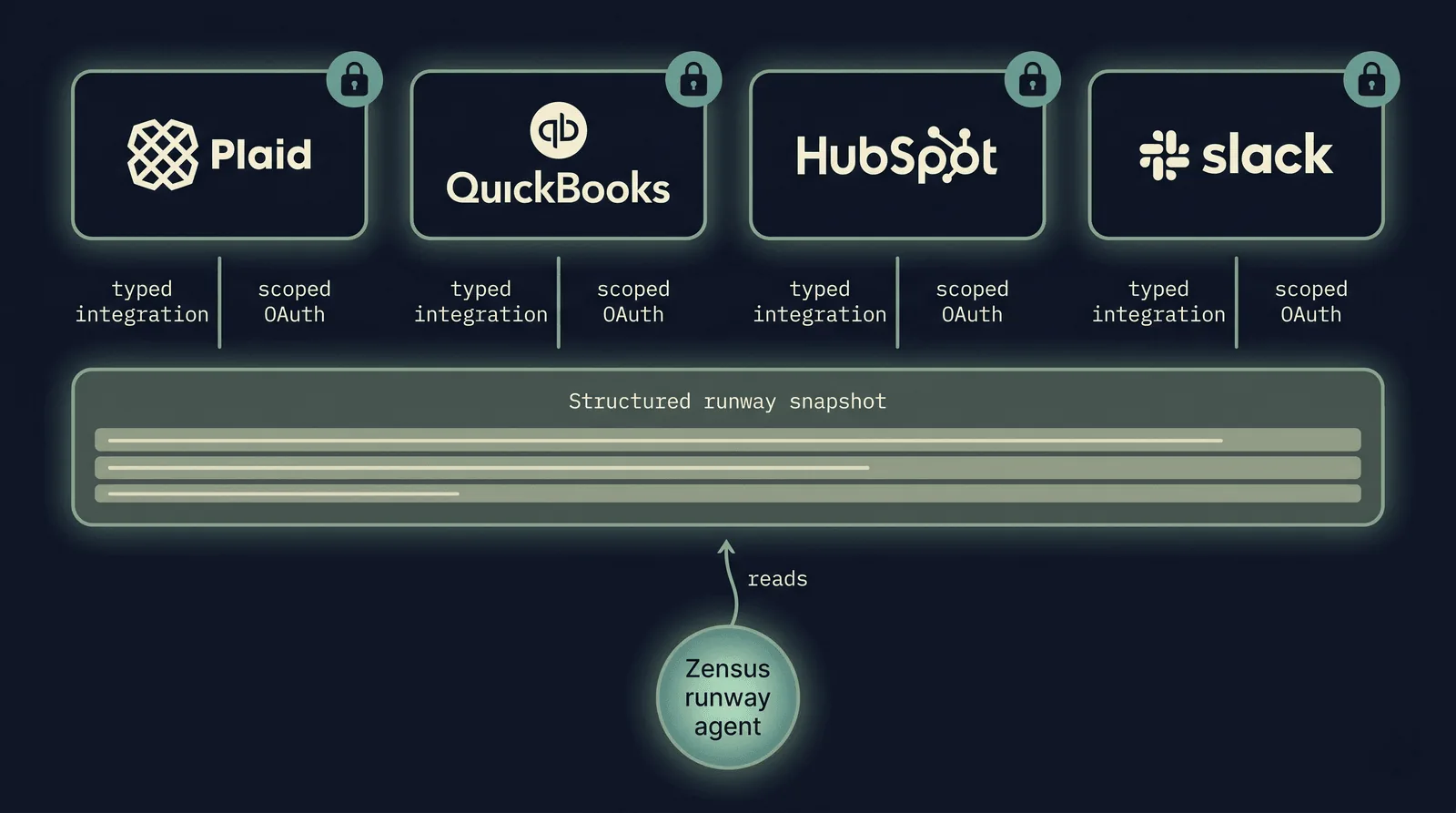
Zensus is a cash flow forecasting and planning platform for founders with variable revenue. The product, described on the features page, is built around four data sources: bank (via Plaid), accounting (via QuickBooks), CRM (HubSpot), and notifications (Slack).
Zensus is not an MCP server today. The integrations connect to QuickBooks, Plaid, HubSpot, and Slack through their own OAuth flows. But the architectural principles MCP encodes are the principles the product is built on.
In practice, that means:
Typed integrations, not shell access. Every data source is connected via a typed integration with scoped permissions. Read the per-source detail on the integrations hub, the QuickBooks page, and the Plaid page.
Audit-friendly data flow. Every sync is logged. The cash flow agent answers questions from a structured snapshot of your data, not by inventing a path to your bank session on the fly.
Scenarios in natural language, on top of typed data. Founders can ask scenario questions like "what if we lose our largest annual contract" and watch the cash flow forecast update live. Details on the scenarios section.
Alerts that ride on the same trustworthy data layer. Set a cash floor on your 30-day projection and get Slack alerts when you breach it, with re-alerts on material changes.
The bet is that the choice between CLI and MCP is really a choice between "fast and flexible" and "trustworthy and auditable." For an AI tool that touches finance data, the second one is what founders should ask for, whether the product is built on MCP or on equivalent typed-integration principles.
Final Thoughts
MCP and CLI both have a place in the AI agent stack. CLI is the right tool for developers who need flexibility on their own machine. MCP is the right tool for agents that touch real systems of record.
For founders and finance teams, the practical takeaway is short. When you evaluate an AI tool that wants access to your books, ask three questions.
A short evaluation checklist:
- does the tool reach my finance data through a typed integration with scoped permissions, or through a shell on a machine somewhere
- can the vendor show me a structured log of which records the agent read or changed
- does the vendor treat the AI as a data processor under my WISP and security program, with a corresponding subprocessor listing
Those three questions cover most of what the MCP versus CLI debate is actually about. The protocol details matter less than the posture they enable.